
SOVHELM / Product guide
From business goals to today's work.
SOVHELM helps owners, partners and operators coordinate work across their businesses. Connect goals to projects, assign tasks to responsible people and keep routine work on its own schedule. Make clear who does the work, who follows it through and who approves the result.
Use it for supplier orders, quality checks, client delivery and marketing plans, alongside month-end reviews and renewals. Give people the instructions and context they need through Notes, procedures and handovers; keep responsibility, deadlines and approvals on the related work. Your inventory, accounting, shipping and campaign systems remain the source for their specialist records.
Interface guide updated . Screenshots show the real app with fictional sample records, not customer results. Demo profile, persona and tour controls are omitted for clarity; working controls and records are unchanged.
Start the guided demo Explore freely Request a private walkthrough
Notes / procedures / handovers
Keep the know-how with the work.
Give someone the information to do the job, not just its title. Keep a supplier specification, client brief, meeting note or shift handover with the relevant work. Start privately, organise useful writing into notebooks and sections, and choose what to share when it is ready.
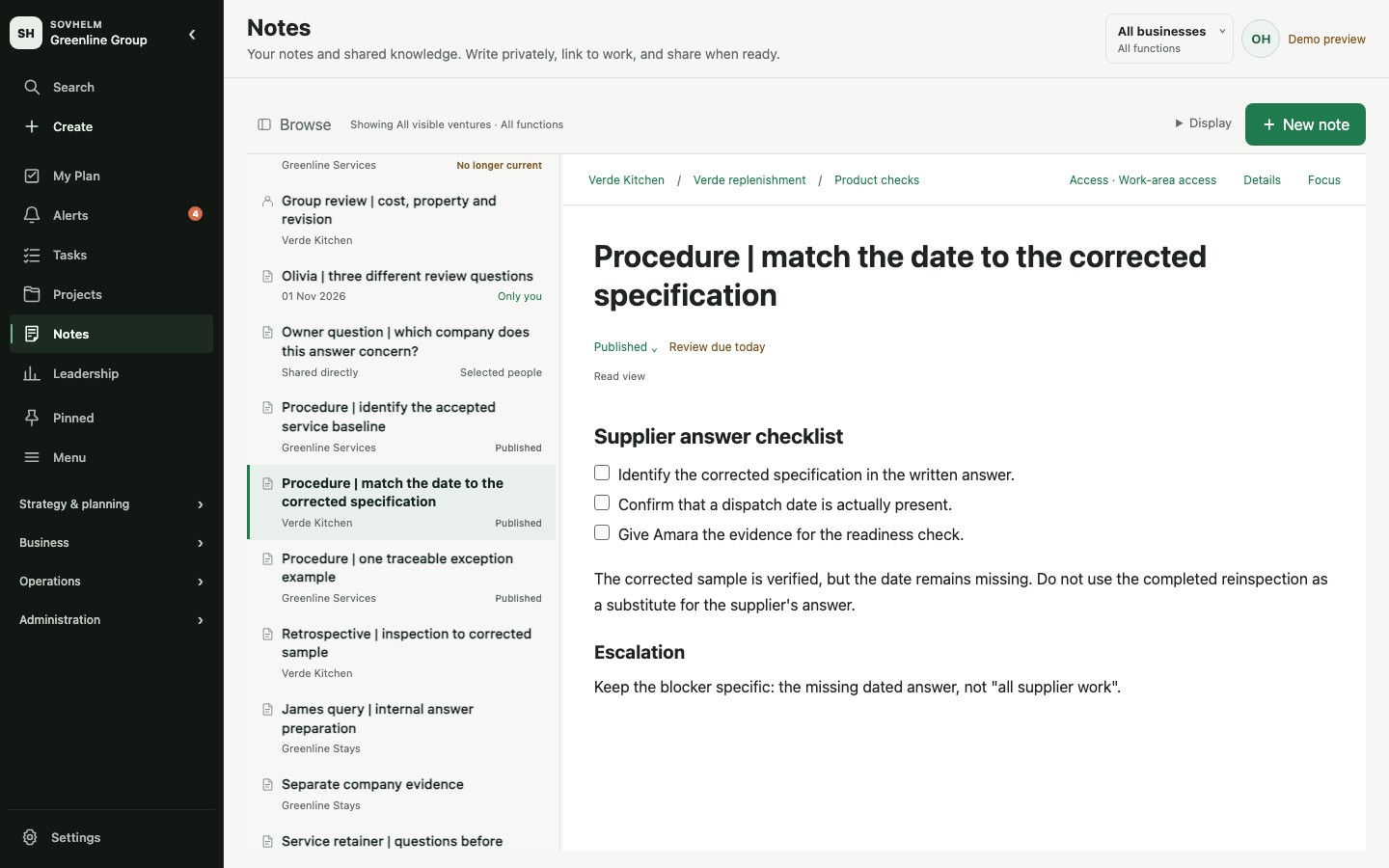
Responsive web workspace with fictional demo data, not a native-app screen. Open full-size screenshot.
- Start with Only me. New notes are private. Share with selected people as readers or editors, or deliberately choose a business, function, project or legal entity as the work area whose membership controls access.
- Keep a shared notebook organised. A managed notebook gives its sections and pages one audience. Review the pages and audience before confirming a change. New notes still start private; adding saved writing to a notebook is a separate choice.
- Link the work without widening access. Connect a note to a task, project or other permitted record for context. Linking a note to work does not share it or grant access to the linked record.
- Make current guidance easy to recognise. Publish reviewed writing for its existing audience, set a review date and mark replaced guidance as superseded. Review due prompts a person to check the guidance; it does not automatically withdraw it. Use History & recovery to inspect earlier saved versions where permitted.
Publishing does not make a note public. When saved writing moves into a work area or a shared notebook, earlier private drafts and history stay with the original; they are not shared along with it.
Images and files. Keep reference photos, specifications and supporting documents alongside the guidance people need. Images and files follow your workspace attachment settings, access permissions and file-safety checks.
Keep guidance and responsibility connected. Notes and checklists do not automatically become tasks. A checklist in a note is writing, not task completion or automatic task creation. When something needs action, use a related task for its responsible person, due date, status and approval.
From a procedure to a clear handover
Illustrative setup: before a supplier shipment, put the agreed inspection steps in a shared procedure. Link it to the quality-check task, assign the check and its deadline, then record the result and approval on the task. The next person can find the instructions and see what is still waiting. People carry out the inspection and arrange shipping; the note does not do those jobs automatically.
The same pattern works for a service team's client brief and delivery review, or a contractor's visit instructions and follow-up. Keep reference material in Notes; create tasks for the actions that need a responsible person.
Keep the limits clear. The demo's illustrated notes use synthetic reference diagrams, not inspection evidence or customer files.
Follow the Notes story: compare an illustrated sample retrospective with the independent supplier, cost and shipment checks. Try the native editor or choose Read story. The demo illustrates private notes, selected sharing, notebooks and review states; it does not verify hosted permission enforcement or real delivery.
Illustrative setup / A product launch
Make the next handover clear.
Create a launch project under the right business and link it to the goal it supports. Assign the work, due dates and approval responsibilities. One person can hold several roles; a contractor need not join if someone in the workspace handles follow-up and records their updates.
- Supplier order: record the agreed specification, order confirmation and production date with the person handling the supplier.
- Quality check: give the inspection a responsible person and due date. Attach the report for the designated reviewer to approve or request changes.
- Shipment preparation: keep missing sign-off visible as waiting work. The person arranging shipping records the packing list and booking confirmation after approval.
- Marketing launch: assign campaign preparation and an availability check. Review current stock and delivery information with operations before agreeing the launch date.
Keep the boundary clear. People obtain the supplier updates, inspect the goods and act in the ordering, shipping or marketing systems. SOVHELM records responsibility, status, evidence and decisions; this setup does not imply automated factory triggers, live stock tracking or campaign reporting feeds.
For a service business, use a client brief, delivery plan, review and customer follow-up instead. In either case, review the actual business result as well as whether the tasks are complete.
Follow the cost-review and dispatch story. Read the revised cost evidence, optionally accept only that review, then check why dispatch is still blocked. The public demo contains sample tasks, not this entire illustrative launch.
Your first workflow
Follow one task from company to decision.
Choose the business closest to yours. Each introduction follows existing records, explains what remains unresolved and finishes with a named next owner. No signup or real records are needed.
- One business: Verde Kitchen. Separate a completed carton correction from the supplier answer still needed.
- Growing group: Greenline Group. Review a cost pack without declaring the shipment ready.
- Portfolio: Greenline Portfolio. Follow a shared-team capacity choice through to the people who must act on it.
Choose Try it for guided actions or Read story for a written walkthrough. You can pause, explore and resume; restarting a story does not reset demo edits. As you explore, check these four things:
Find its company.
Open a task from Tasks. Check its venture, function and linked project. Can you tell which business the work belongs to without asking someone?
Separate doing from deciding.
Identify the owner, assignee and approval requirement. The person preparing the work is not necessarily the person who can sign it off.
Read the evidence.
Review the comments, supporting files and dates on the task. Decide what is still missing before an approver can act. Keep internal targets distinct from final deadlines.
Check the other view.
Use the demo's role selector to compare a founder's view with a team member's. Check what changes in the task list and search. This illustrates the workflow; validate your own access settings before adding sensitive records.
A useful first result: you can name the company, the next responsible person and the evidence needed for a decision.
Leadership Pulse
Read the snapshot, then open the work behind it.
Pulse brings current delivery work, blocked or waiting items, review work and loaded objective evidence into one view. Compare businesses within your visible scope, then drill into a business or open Interventions to inspect the underlying records and next responsible person.
Delivery flow & bottlenecks shows newly recorded open work, accepted completions and the unfinished balance, with waiting and review queues you can inspect. Complete-week charts exclude the current partial week. Figures use accessible, continuous history, not the whole company backlog; cancellations can also reduce unfinished work. Counts and waiting age are not measures of effort or productivity.
A current picture, with room for evidence to build. Trends becomes useful as complete weeks of measurement history accumulate. Until then, unavailable measures stay unmeasured. Task completion and reporting freshness are useful signals, not proof of revenue or business success.
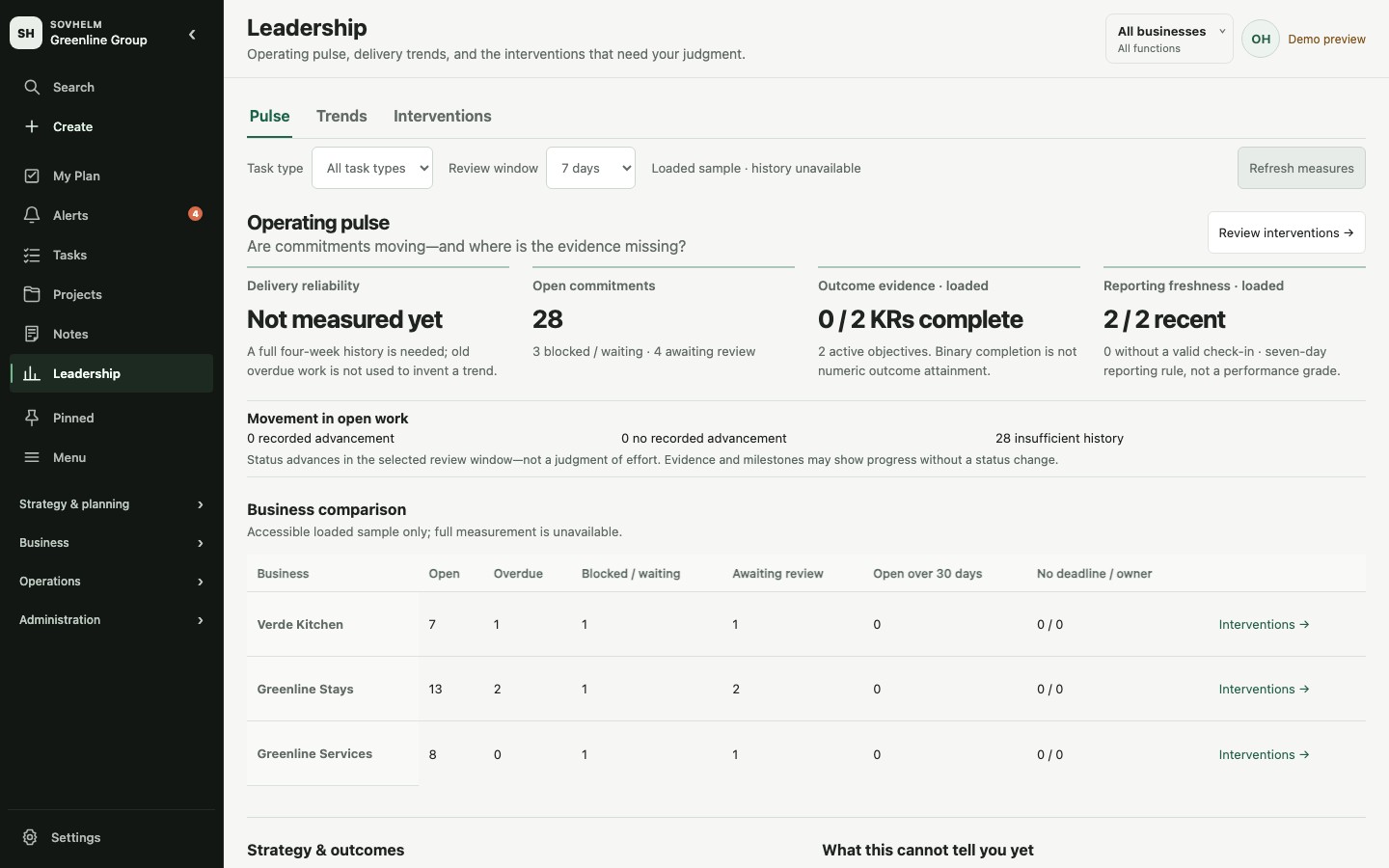
Current interface with fictional demo data. Missing history stays unmeasured. Open full-size screenshot.
Daily work
What needs me, and what will I do today?
My Plan is your personal register of chosen work. It starts empty: use Choose work to select from accessible tasks, projects, risks and decisions, including work needing a reply or approval. There is no fixed five-item limit. Put items in My order, park work or remove it from your plan without changing the underlying record.
Find the work you need by business, function, project, person, status or date. Group related items or keep your own order. Your plan is a chosen focus, not the full list of everything that needs attention.
Task detail keeps the accountable owner, assignee and approver distinct. Open a task to inspect its business and project, acceptance criteria, status, dates, comments and supporting files. Review evidence and any proposed date change before approving work; an internal target is not the same as a final deadline.
Alerts: seen does not mean handled. Use Needs action for pending requests and Later for snoozed events. Marking an alert seen acknowledges the event; Archive tidies your inbox. Neither completes the task or resolves the request. Outstanding actions still includes unfinished requests that have been snoozed or archived. Open the related record to act.
For example, choose a supplier approval and a routine month-end evidence check, open each task's discussion, then return to your own order of work.
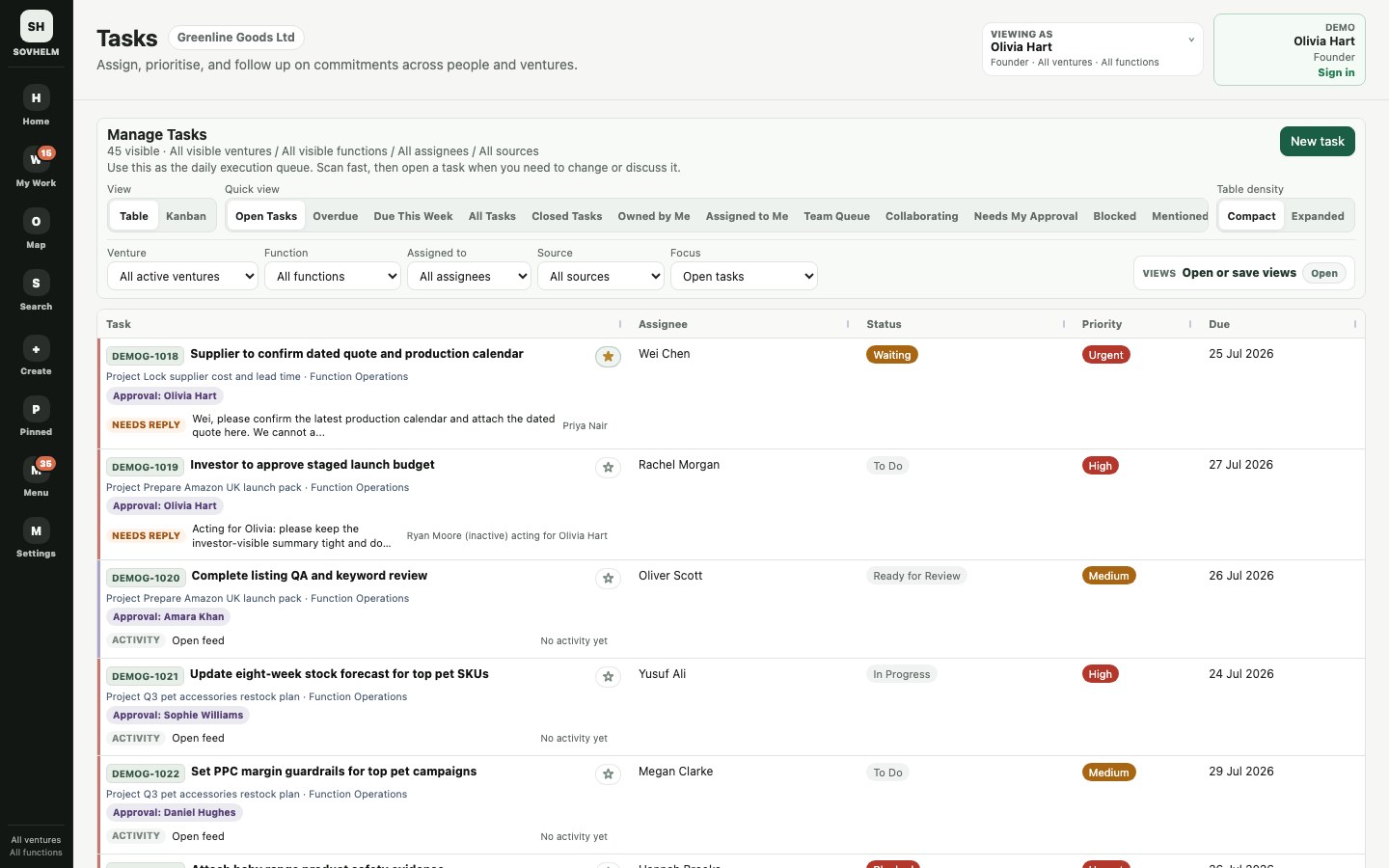
Try My Plan · Inspect Tasks · Explore in-app Alerts · Open the full-size Tasks screenshot
Strategy Review / OKRs
Review outcomes, not just the task count.
Strategy Review compares objectives, accountable owners, recorded health, check-ins and supporting execution. Filter by business, owner or check-in condition, then open an objective to review its key results, linked projects and tasks, and explicitly linked decisions.
Keep progress grounded in results. A missing check-in stays unknown, not green. Review the result against its target and evidence, rather than assuming that completed tasks mean the goal has been achieved.
For a customer launch, review the actual repeat-booking result; for a routine finance improvement, review the agreed reconciliation outcome. Use the objective's targets and supporting evidence to decide the next action.
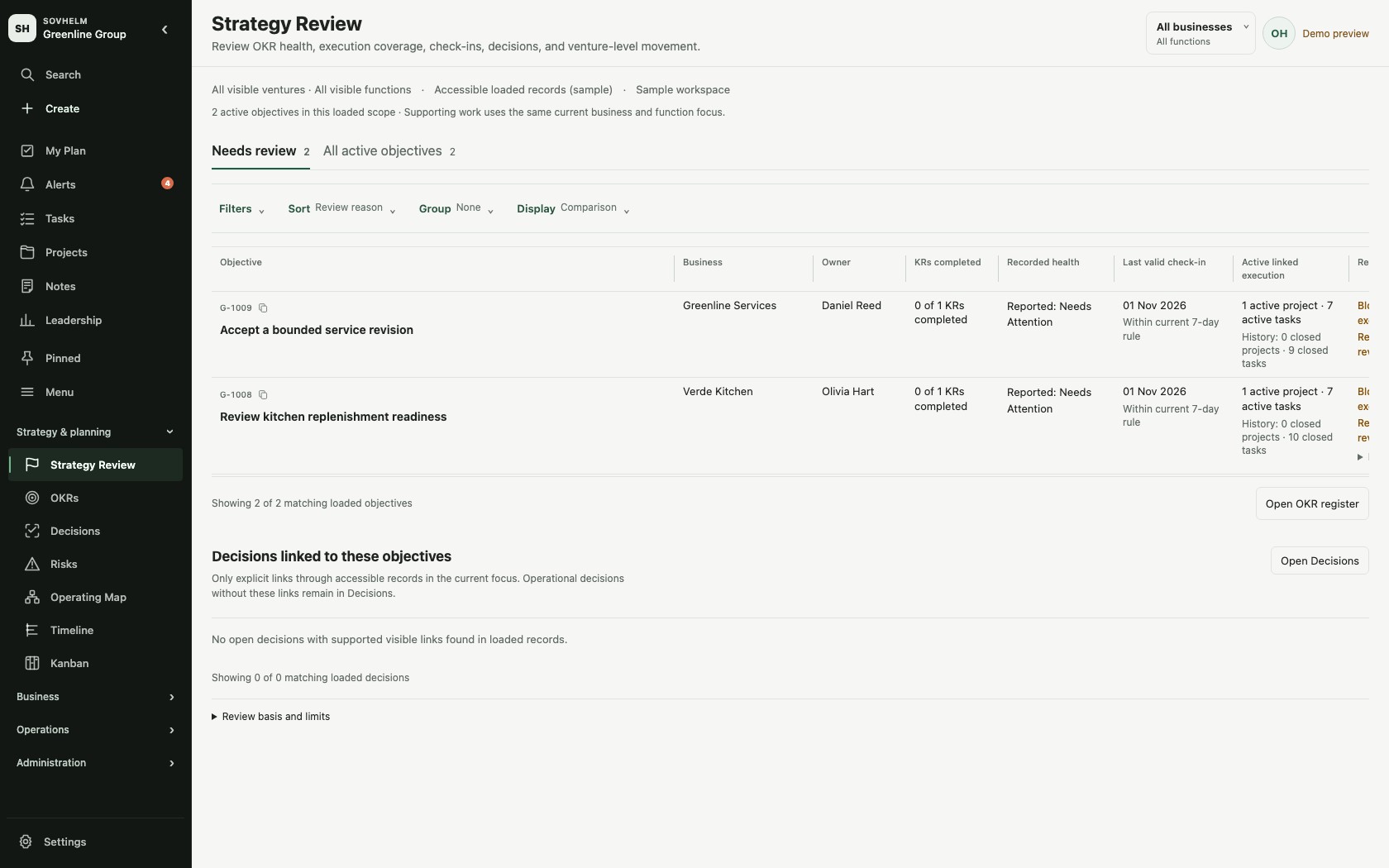
Current interface with fictional demo data. Review objectives, supporting work and reporting gaps together. Open full-size screenshot.
Company structure
Keep the group connected without mixing the businesses.
Businesses is the company register. Open a business and use Connections for its relationship map: accountable owner, functions, assigned people and linked legal entities. Its People directory separates workspace role, function and responsibility. A linked entity is an association, not a statement of legal ownership; a function lead is not automatically an approver.
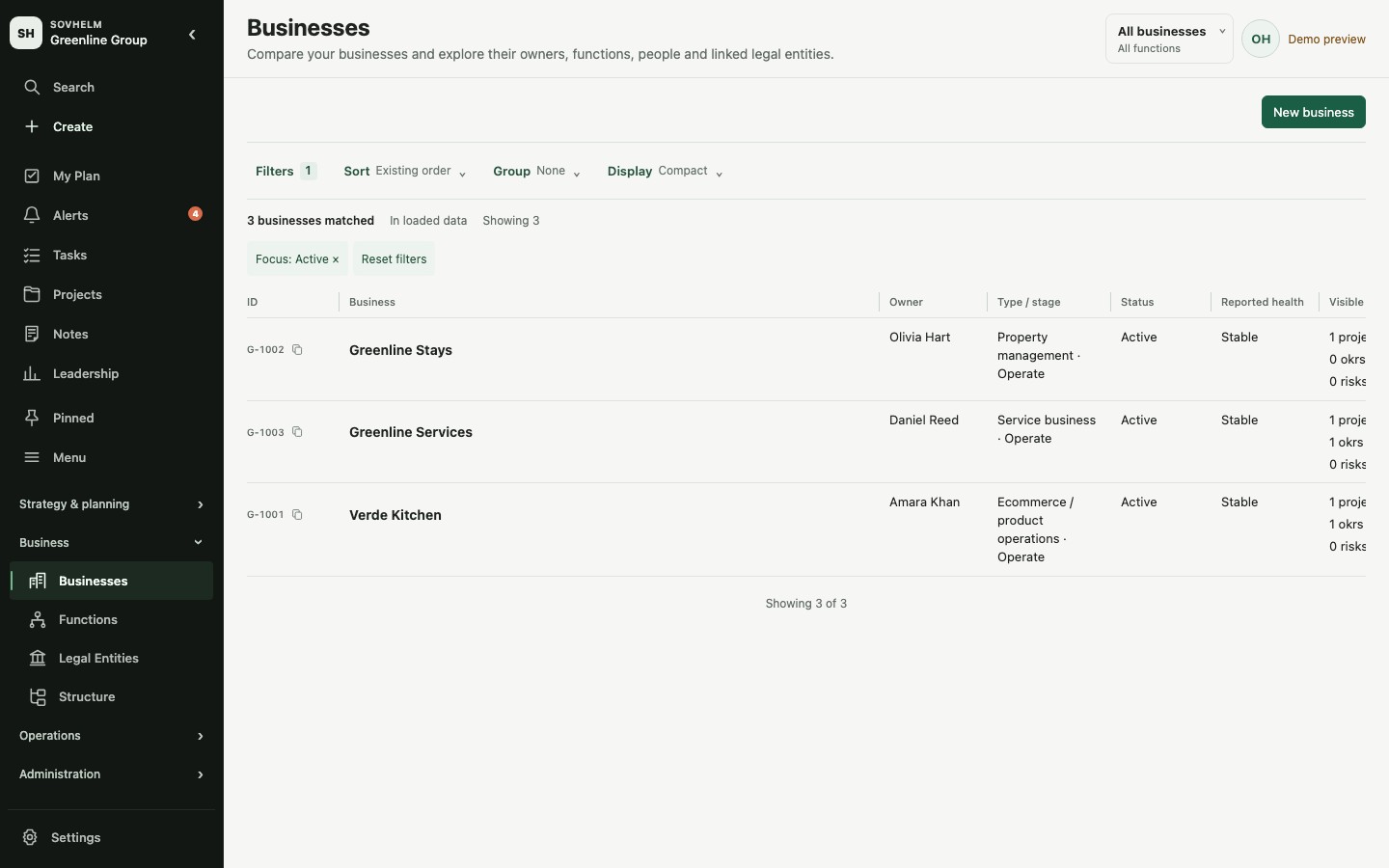
Responsive web workspace with fictional demo data. Explore Businesses or open the full-size screenshot.
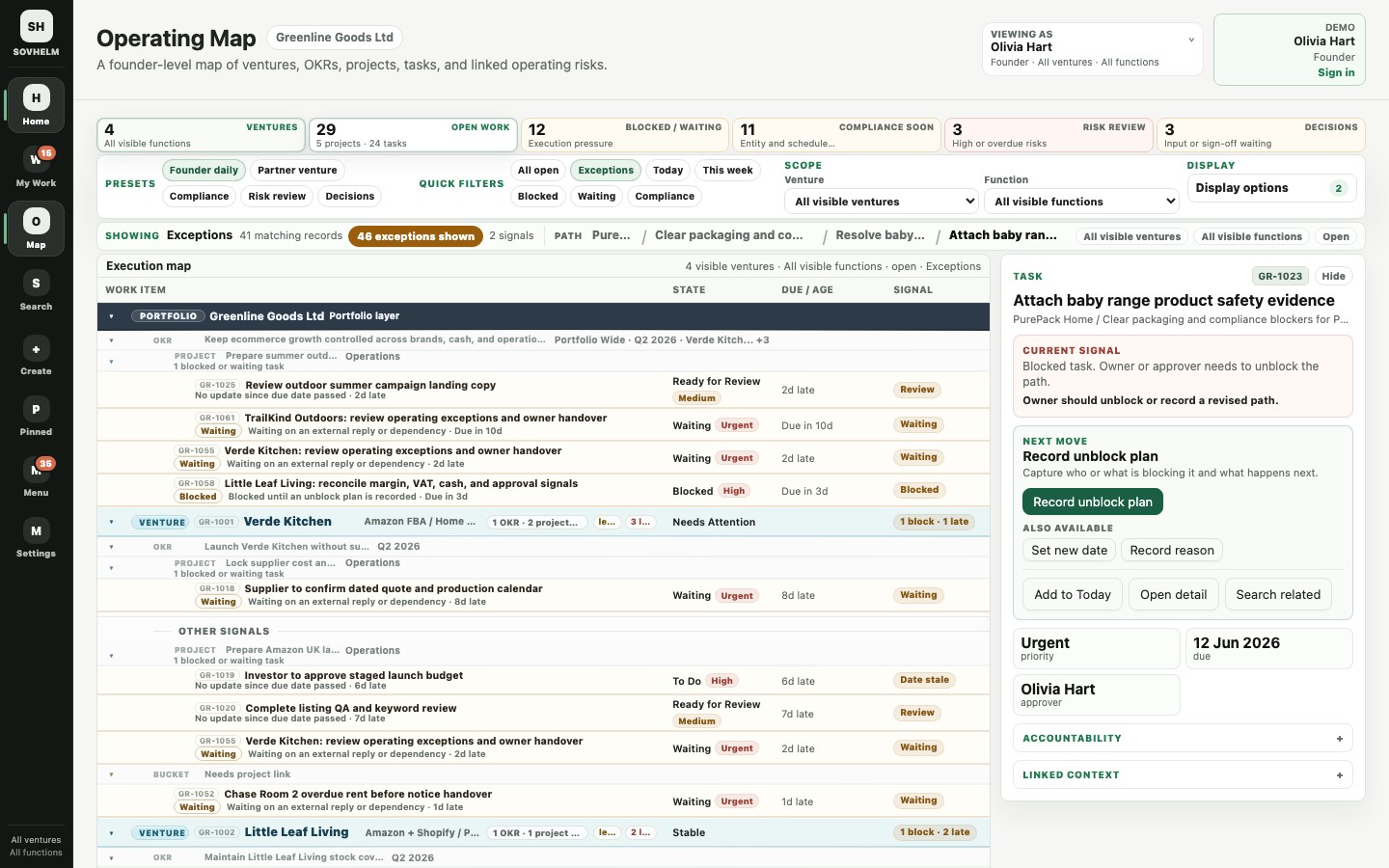
Operating Map connects portfolio and venture objectives, key results, projects and tasks. Use company and function context to narrow the view, inspect a branch and open the work behind it.
Tasks and Projects retain owners, assignees, status, deadlines, discussion and supporting files. The person responsible for an outcome can remain distinct from the person doing the work and the person approving it.
Progress connects work to the outcome. For example, a launch goal might have an example target of five repeat bookings within three months, with a responsible owner and supporting project tasks. That target is illustrative, not a result or promise. Review results, not just completed tasks, alongside the routine queue.
Search keeps the scope clear. In Tasks, search the tasks visible after your filters, or choose Search all accessible work to look more broadly. Advanced Search can narrow by record type and other filters without widening your permissions. Reference IDs help locate a particular record; linking or searching does not reveal a private note to someone outside its audience.
For a shared finance team, the practical question is not only "what is overdue?" It is "which company is responsible, who owns the next action, and what evidence is missing?"
Explore Businesses · Explore Operating Map · Try scoped Search · Open the full-size Operating Map screenshot · Multi-business management · Shared finance and operations
Projects
Separate accountability from day-to-day execution.
The project register keeps the accountable owner and execution lead visible as separate responsibilities. Filter by either role, business, status or linked OKR; open the project to inspect its tasks, dates, discussion and supporting context.
A client delivery project and a routine reporting improvement both need someone accountable for the outcome and someone coordinating execution. Check blocked work and review requirements before treating task completion as project success.
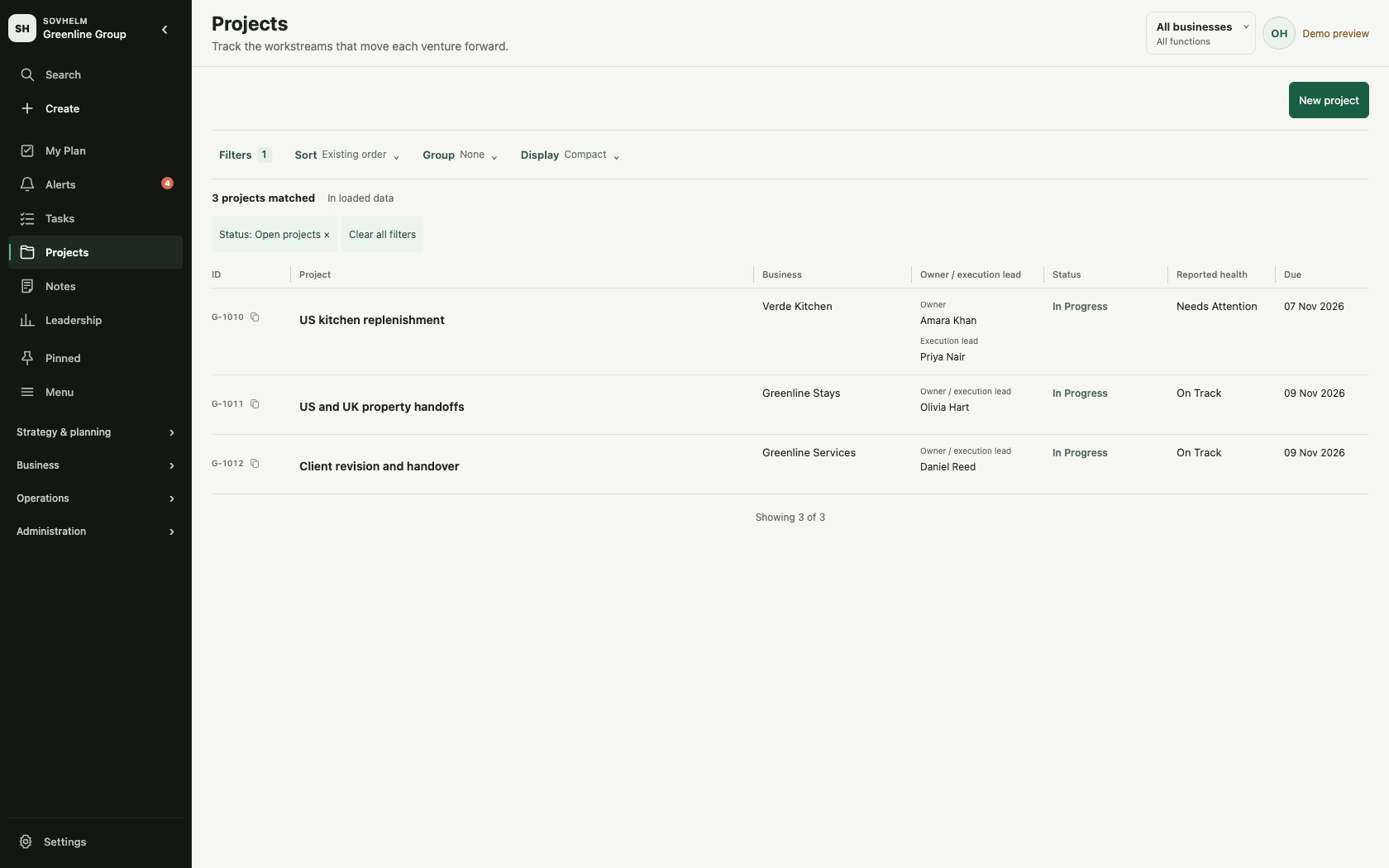
Current interface with fictional demo data. Open a project for its responsibilities and underlying work. Open full-size screenshot.
Operations
Find the next action in the right operating queue.
Operations Control brings accessible blocked or waiting work, supplier and stock follow-ups, launch coordination and handovers into a review queue. Narrow it by business or queue, inspect why an item appears and open the underlying task. These are records of work, not live stock or shipping feeds; an empty loaded queue is not an all-clear for the business.
Finance Control covers finance approvals, evidence gaps and month-end work. Property Operations provides property context for rooms, occupancies, rent checks, notices and related tasks. Use the relevant workspace to review responsibility and evidence; these views do not execute bank payments or replace specialist systems.
Property context on a task can identify the property, room or area, and system or equipment involved. For example, keep a repair tied to the right room while its owner, deadline and approval stay on the ordinary task. The property must fit the task's business and function; adding this context does not change who can access the work.
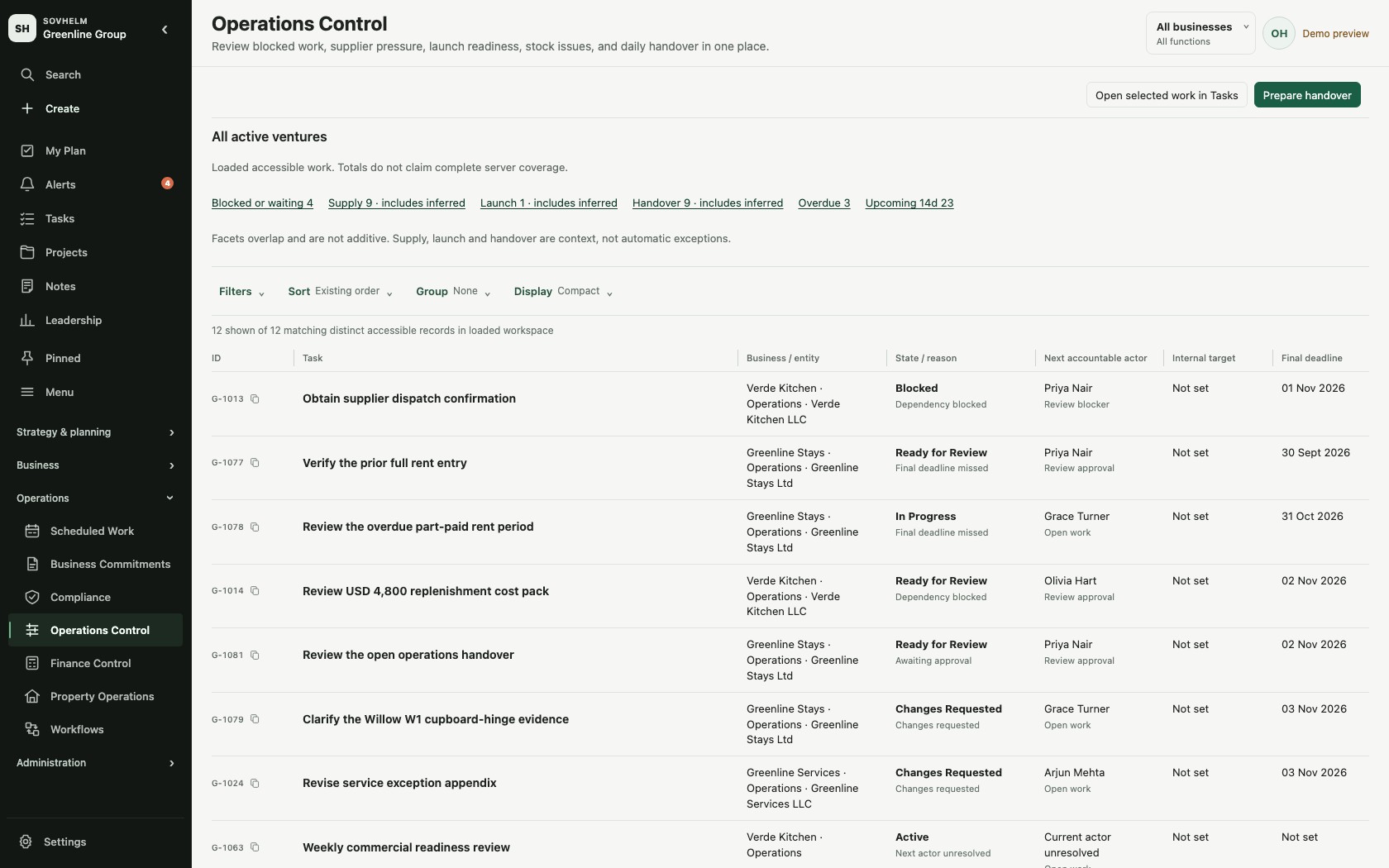
Current interface with fictional demo data. Review the queue, then open the source record for evidence and action. Open full-size screenshot.
Explore Operations Control · Explore Finance Control · Explore Property Operations
Recurring work
Keep stock reviews, follow-ups and obligations moving.
Scheduled Work separates schedules from generated tasks. Schedules lists recurring rules, including paused schedules, their setup and upcoming dates. Work needing action lists generated tasks requiring attention. A future preview date is not yet a task, and an empty action list does not establish complete coverage. Review the relevant scope and generation preview before confirming work.
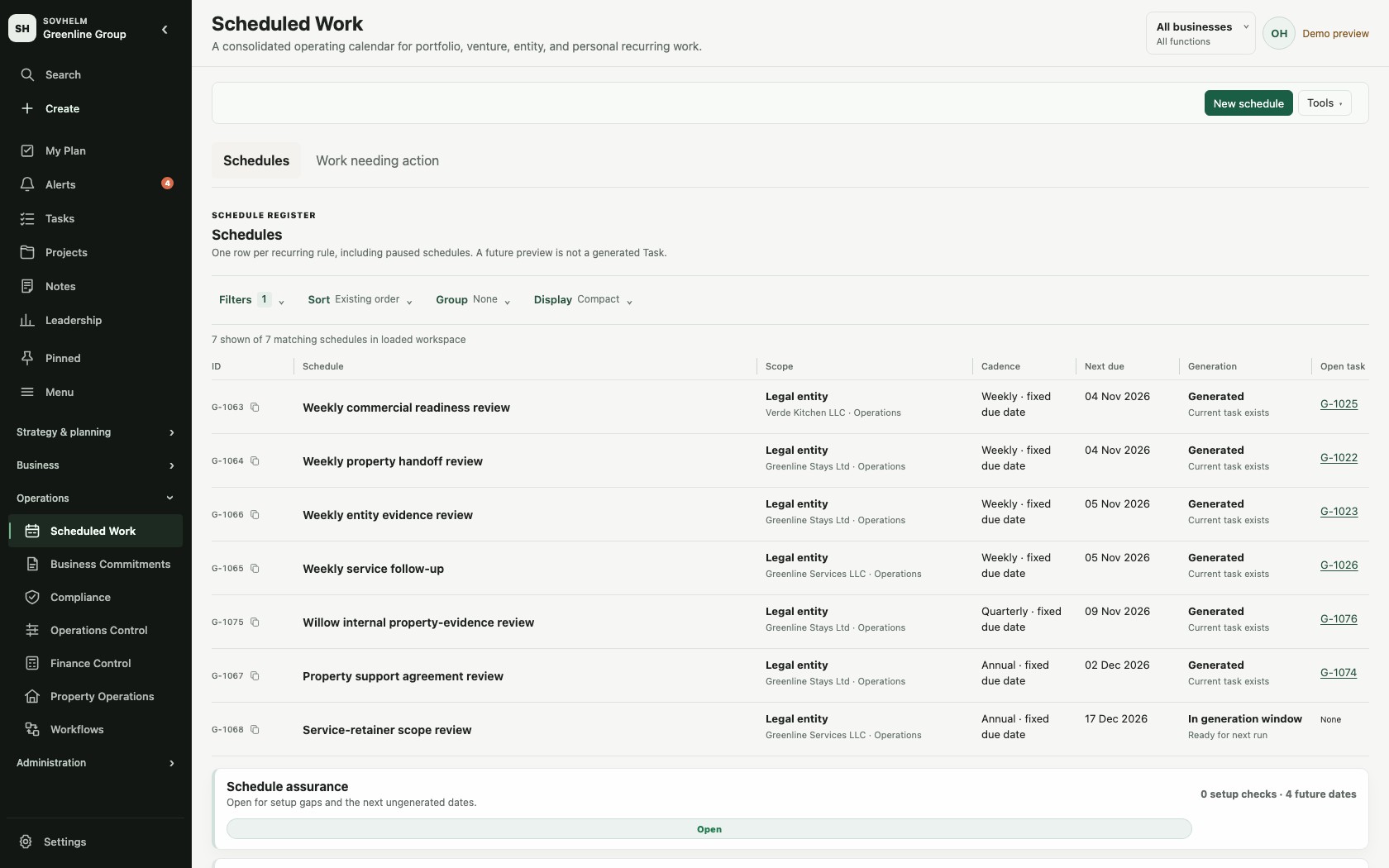
Current interface with fictional demo data. Schedules define the routine; generated tasks carry the work and approvals. Open full-size screenshot.
Commercial routines can include a weekly stock review, supplier update or campaign review. The assigned person checks the specialist system, records what needs attention and creates follow-up work with a deadline and reviewer. Generating the review task is not the same as checking inventory or reading campaign results automatically.
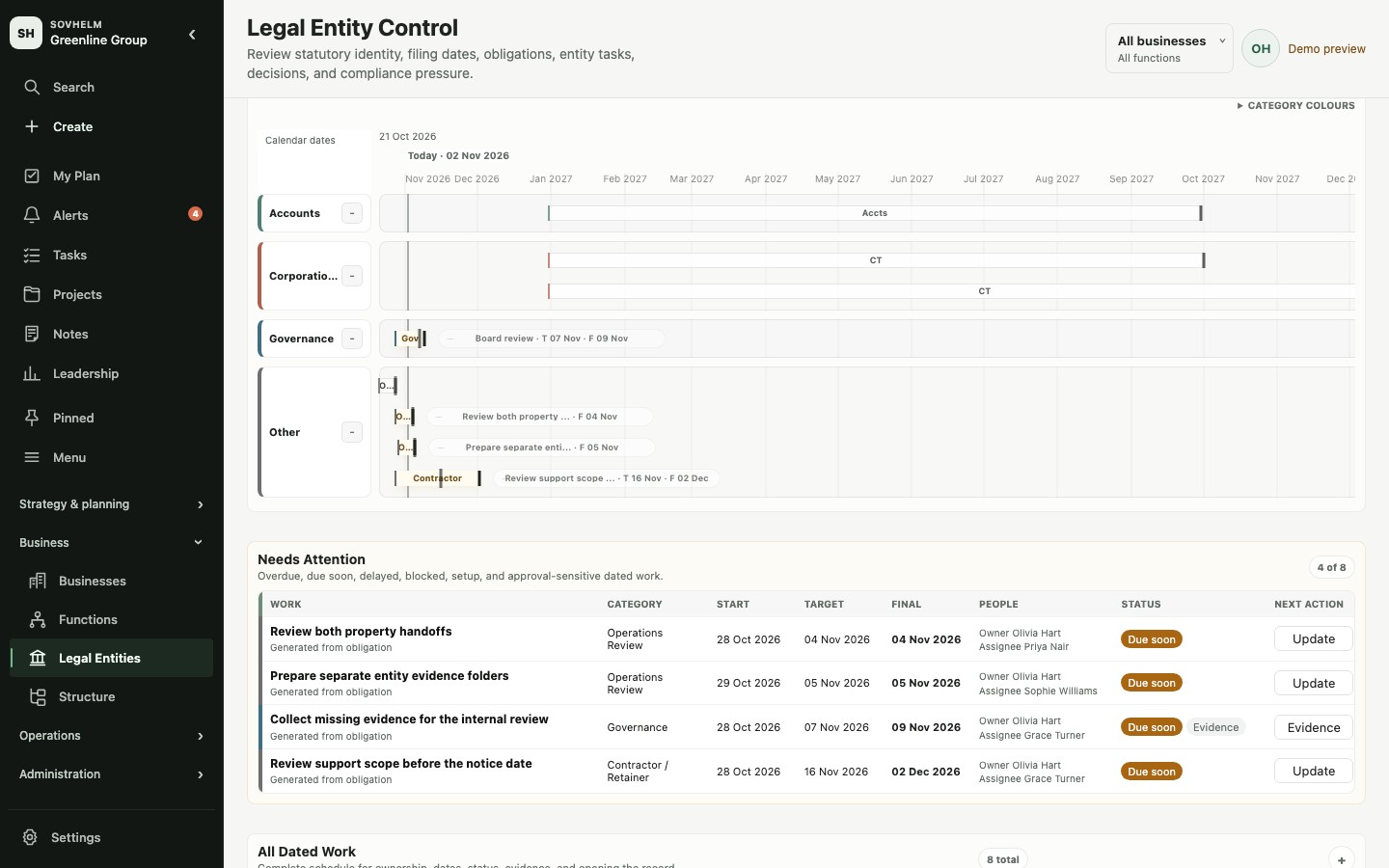
Legal entity dates keep preparation windows, internal targets and final deadlines separate. Different entities can carry different obligations; the organisation remains responsible for validating the applicable dates.
Entity-specific coverage can start with UK Ltd and US LLC examples, then extend to another country, entity form or custom obligation through an adviser-reviewed schedule. SOVHELM does not provide every jurisdiction's rulebook or promise worldwide compliance.
Keep the source clear: statutory requirements come from an official authority, contractual dates come from an agreement or policy, and internal dates come from your operating plan. Advisers confirm applicability; official systems handle filing or submission.
Commitments provide a register for promises and follow-ups that need an accountable person, a next action and linked operating context.
A recurring subscription review can ask: are we using it, what does it cost, and what value does it provide? Assign the review to the right decision-maker before the contract's notice deadline. Any renewal or cancellation action happens with the provider outside SOVHELM; record the decision, action and provider confirmation in the workspace.
Explore Scheduled Work · Inspect Legal Entities · Open the full-size entity dates screenshot · Multi-entity deadline tracking
Time zones and alerts
Keep the operating deadline clear across locations.
Three clocks stay distinct. For an exact, timed task deadline, operating time gives the business or entity moment its meaning; viewer time shows that same instant elsewhere; notification time follows the recipient's configured timezone and preferences. Date-only obligations remain calendar dates and are not converted to midnight.
Quiet hours can defer delivery but do not move the deadline. Alerts are conditional, not an always-on push promise: channel setup, consent, an eligible device, working hours, quiet hours and urgent or priority settings all affect delivery.
People and access
Delegate the work, keep approval responsibility clear.
Venture membership, roles and private-record controls determine what someone can see and do. An investor's view need not expose internal supplier discussions; a shared function can work across the companies within its permitted scope.
Assistant delegation keeps the person acting and the person they act for distinguishable. Protected decisions and approval responsibilities should be reviewed as part of the workspace configuration.
Before an assistant starts acting for someone
- Use separate accounts. Do not share the founder's credentials. Confirm who acts and whose work they are supporting.
- Agree the scope. List the companies, records and preparation work the assistant needs. Keep final decisions with the authorised approver.
- Test the boundary. Check one permitted record and one restricted record with the intended user accounts. Review task, search and file visibility, then confirm the actor is distinguishable in the relevant history.
For example, an assistant can gather a renewal pack and chase missing material while the responsible owner retains the decision. Review the configuration for that specific workflow before relying on it.
The responsive web workspace is available on desktop and phone using the same account and permissions. Evaluate your actual phone and workflow during the walkthrough, including any native-app or notification requirements.
Explore an example access configuration · Read the Trust Center
Mobile
Review the same work on a phone.
Use the web workspace in your phone's browser or add it to your home screen as a web app (PWA). Review My Plan, task details and Alerts with the same account and access rules. Those three phone exhibits show the installed web app in an iPhone simulator, not a native App Store app. The Notes phone exhibit is a responsive browser capture. All use fictional demo data.
Prefer an installed app? Get SOVHELM for your device: choose the Android app on Google Play, home-screen web access on iPhone, or your desktop browser. Installation uses your existing account and does not change your subscription.
Evaluate SOVHELM
Start with one workflow that matters.
- Explore without signing up. The public demo uses sample records, separate from live workspaces.
- Choose a concrete test. Follow a supplier approval, customer delivery project or recurring review from the overview to its task and evidence.
- Review your structure. List the companies, shared functions and decision-makers for that workflow. A private walkthrough can help resolve questions; sensitive records are not needed.
- Choose your plan. Compare the monthly plans with the companies you need to coordinate, select GBP or USD and start a 30-day trial. Contact sales before ordering for larger teams, substantial storage or custom agreements.
For a first live rollout, choose one company, a small set of users and a non-sensitive workflow. Confirm access, ownership and approval behaviour before broadening the scope. Keep existing critical deadlines covered while the team makes the transition.
The pricing page shows GBP and USD monthly prices and UK VAT-inclusive totals. Checkout collects payment details and starts a 30-day trial, followed by monthly billing unless cancelled. Your workspace access email is sent to the checkout address. The public demo and private walkthrough remain available without a subscription.
Request a private walkthrough Open demo Compare monthly plans Contact sales
Practical operating guides
Put the structure to work.
- Manage multiple businesses without mixing records: keep requests, decisions and evidence with the right business.
- A shared finance team workflow across companies: follow a request from intake through review, approval and completion.