
“Renew supplier”
The team must search messages to determine the company, decision-maker, date and contract version.
SOVHELM / Operating guide
Published
A central finance team can standardise the way requests are handled without losing the company, owner, approver, deadline and evidence that each request needs.
This is a workflow guide for founder-led groups, family businesses, shared finance teams and small portfolios. It is not accounting, payment, tax-filing or ERP advice.
Intake first
A request titled “pay supplier” or “review renewal” is incomplete for a shared team. Before it is assigned, capture the fields that make the next action and authority clear.
Identify the company affected by the request. Use a legal-entity field where the obligation, contract or evidence requires that specificity.
State the request type, accountable owner and next assignee. This separates the person requesting work from the person doing it.
Name the authorised approver, the due date and any earlier internal target needed for review or correction.
Link the source file, contract, invoice, decision note or other permitted evidence needed to complete or inspect the work.
Lifecycle
Recurring work follows the same pattern. Define the company scope and recurrence, review the generated task, then retain the period's evidence and completion history. Multi-entity deadline tracking explains how internal targets and final dates can remain separate.
Illustrative workflow
Illustrative scenario, not a customer story: a finance coordinator receives a supplier-renewal request for one subsidiary. The request is scoped to that company, assigned to the coordinator and linked to the contract. The accountable owner confirms the commercial need; the authorised approver reviews the terms. When the external renewal is completed, the decision and supporting evidence remain attached to the work.
Illustrative comparison
The team must search messages to determine the company, decision-maker, date and contract version.
Company context, owner, assignee, approver, due date, status and evidence form one reviewable path.
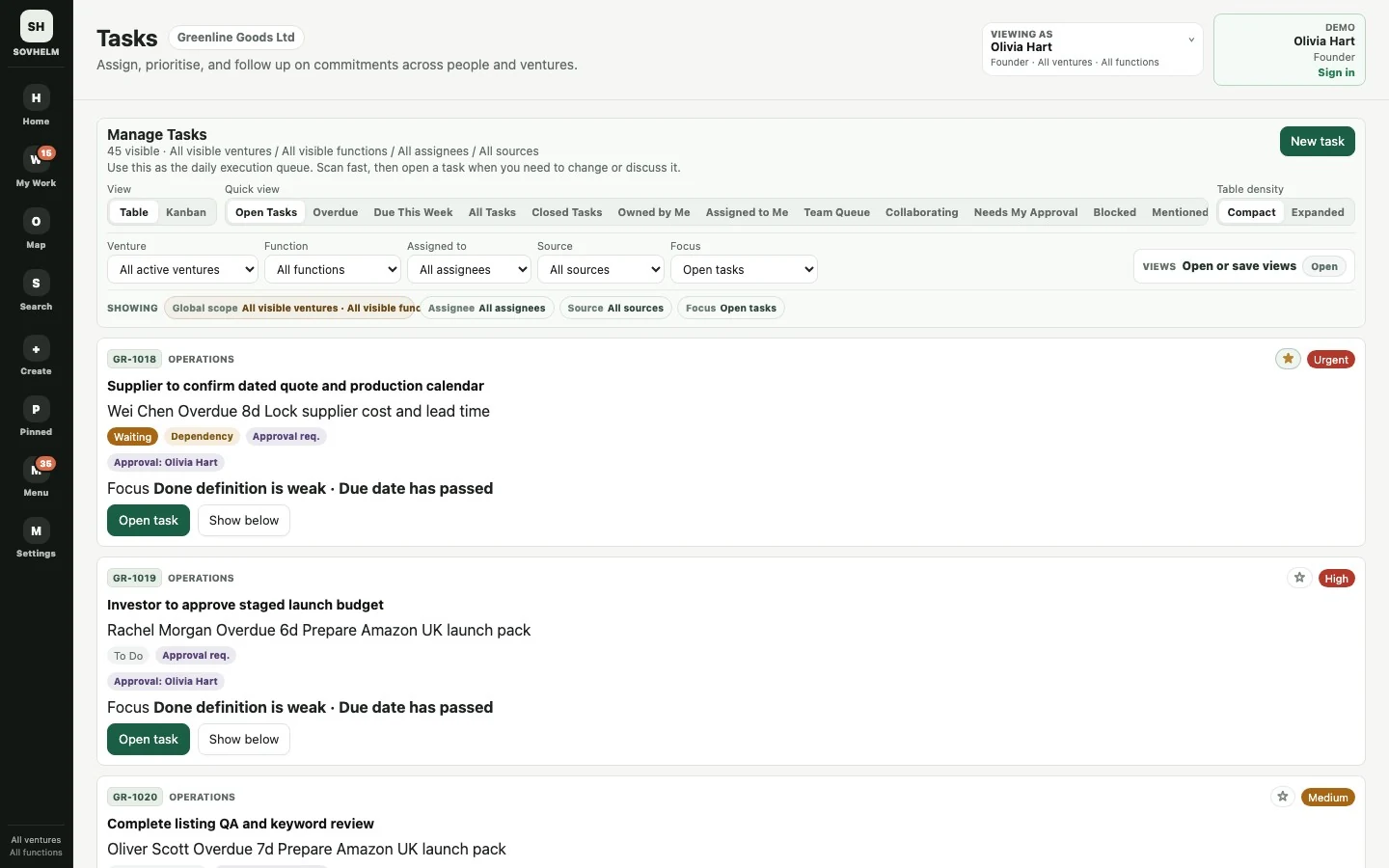
Tasks in the sample workspace retain venture, function, assignee, state and deadline alongside the work.
Open full-size screenshotAccess boundary
Shared finance teams may need a view across permitted companies, while a local owner or external participant should see only the relevant request. Review role, company, function and record scope together; then test what search, files, comments and approvals expose for each intended role.
SOVHELM coordinates operating requests around finance systems. It is not the general ledger, payment processor, tax-filing service or ERP. For company separation, read how to manage multiple businesses without mixing records. Read about the wider operating model in shared services software and the access posture in the Trust Center.
Evaluation checklist
Next step
The public demo is separate from live workspaces. Request a private walkthrough to map the team's company boundaries and approvals without sharing sensitive records by email, or review current pricing.